Before you press the button.
Does this trade break your firm's rules? It counts your open trade too.
Screenshot reading is new. Check what it fills in against your screen. Got one wrong? Send it.
What to send
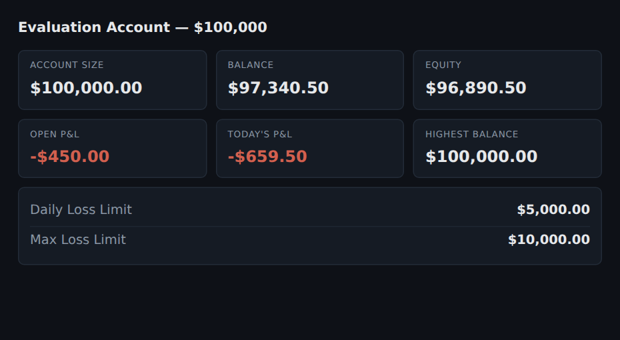
A tight crop works best. Less on screen, less to misread. It reads dollars, not percentages — a firm that only shows “5%” leaves that box alone rather than guess.
It reads whatever is there and leaves the rest alone. Two numbers still saves you typing two numbers.
Worth having in the shot:
- Account size and balance
- Equity or open P&L — the one most tools ignore
- Daily loss limit and max loss, in dollars
- Highest balance, if your firm trails your floor
Send your order ticket too. Entry, stop and size are on that, not on the dashboard. The answer appears once both are in.
It reads. It does not check. You see everything it found before a single
number goes in a box, and anything it was unsure of stays switched off until you
tick it. Your firm's dashboard is the truth. This only saves you typing.
The image goes to an AI service to be read and is not stored. Upwick gives
no financial advice and takes no view on whether a trade is a good idea. It does
arithmetic on numbers you confirm.
Check these before they go in.
Your account is in. Now the trade.
Three numbers and it can answer.
- Pick your firm.
- Type your balance.
- Enter the trade — in, stop, how many.
Then: take it, smaller, or don't — with the maths. Free, and nothing leaves your browser.
Why this one?
| Measure | Value |
|---|
This does arithmetic. It does not predict price.